Best NAS With Plex by CPU, RAM and Networking

Seven diskless NAS units compared on the specs that decide smooth playback: CPU, memory, networking and bays. Includes a budget option and a 10GbE six-bay pick.

By Connor SmallUpdated 15 min read
On this page
- How I screened these seven down
- Best NAS with Plex at a glance
- What actually decides Plex playback?
- Does more money buy smoother streaming?
- How many bays do you really need?
- 1. UGREEN NAS DXP2800 2-Bay for Advanced Home Users — Best overall
- 2. TERRAMASTER F2-425 Plus NAS 2-Bay — Runner-up
- 3. TERRAMASTER F2-425 2-Bay NAS — Best budget pick
- 4. LincPlus LincStation N2 6-Bay NAS Server — Best minimal setup
- 5. Asustor Lockerstor 2 Gen2 AS6702T — Best for pros
- 6. UGREEN NAS DXP4800 GT 4-Bay — Best upgrade
- 7. Asustor Lockerstor 4 Gen2+ AS6704T v2 — Best premium
- The verdict
- FAQ
The best NAS with Plex here is the UGREEN DXP2800, an Intel N100 two-bay with 8GB DDR5 and 2.5GbE that pairs modern hardware with a beginner-friendly interface. Step up to the TERRAMASTER F2-425 Plus if you want dual 5GbE networking and 8GB in a lighter 4.19 lb body. Buyers fixate on drive bays, but that is not what stalls a stream. The processor and how it moves 4K video across your network decide whether playback stays smooth or stutters.
How I screened these seven down
I compared the published specifications across all seven diskless units side by side, then cut on hardware, not marketing. My screen ran in a fixed order.
- CPU class first. A media server lives or dies on its processor. Six of these carry Intel N-series or Celeron chips; one runs an AMD Ryzen Embedded R2514.
- Memory second. More RAM helps when several people pull from the server at once. These range from 4GB up to 16GB.
- Networking third. Faster ports matter for large libraries. The set spans 2.5GbE, dual 5GbE and a single 10GbE port.
- Bay count last. Bays set your ceiling, not your speed.
What survived is a spread of two-, four- and six-bay diskless enclosures. Every unit ships without drives, so budget for those separately. All seven are sold by a single seller each, so there is no cross-shopping between listings. Every pick also carries a published warranty, which is rare enough in this category to be worth stating up front. Two of the three-year warranties belong to Asustor.
Best NAS with Plex at a glance
| Pick | CPU / RAM | Networking | Price |
|---|---|---|---|
Best overall UGREEN NAS DXP2800 2-Bay |
Intel N100 / 8GB DDR5 | 2.5GbE | Check Price |
Runner-up TERRAMASTER F2-425 Plus |
Intel N95 / 8GB | Dual 5GbE claim | Check Price |
Best budget pick TERRAMASTER F2-425 |
Intel quad-core / 4GB | 2.5GbE | Check Price |
Best minimal setup LincStation N2 6-Bay |
Intel N100 / 16GB | 10GbE claim | Check Price |
Best for pros Asustor Lockerstor 2 Gen2 |
Intel N5105 / 4GB DDR4 | Dual 2.5GbE | Check Price |
Best upgrade UGREEN DXP4800 GT 4-Bay |
AMD Ryzen R2514 / 4-core | see listing | Check Price |
Best premium Asustor Lockerstor 4 Gen2+ |
Intel N5105 / 4GB DDR4 | Dual 5GbE claim | Check Price |





What actually decides Plex playback?
What actually decides Plex playback is not the number of drive bays. It's the processor and whether it can hand off video decoding to dedicated hardware instead of grinding through it on the main cores.
Two things matter most:
- Hardware transcoding. When a device can't play a file's native format, the server converts it on the fly. Doing that in hardware keeps the CPU cool and playback smooth. TERRAMASTER says the F2-425 handles hardware-level 4K H.265 decoding. Asustor claims 4K hardware transcoding on both Lockerstor units.
- Direct play. If your player supports the file's format, the server just streams it untouched, and almost any CPU here can do that.
The takeaway is simple. If your clients direct play most content, even the 4GB, 2.5GbE units cope. If you have older TVs or you stream away from home, transcoding load climbs, and the extra RAM and faster CPUs earn their keep. That's why I weighted CPU class and memory above bay count when ranking these seven.
Does more money buy smoother streaming?
Higher price positions here buy networking and cores, not necessarily a better Plex experience. Here's the pattern across the set.
The cheapest of the seven, the TERRAMASTER F2-425, still claims 4K H.265 decoding on an Intel quad-core with 4GB. That covers a lot of home libraries. Move up to mid-range and you gain memory or 10GbE. The premium picks add four bays, dual 5GbE and, on the Asustor AS6704T, HDMI output.
None of that guarantees a smoother single stream. A well-matched player doing direct play looks identical on the cheapest and the most expensive box. What money actually buys is headroom: more simultaneous streams, faster file transfers, and room to run other apps beside your media server. If one or two people watch at a time and your files direct play, spend the difference on drives instead.
How many bays do you really need?
How many bays you really need depends on library size and your appetite for redundancy, not on Plex itself.
- Two bays suit most home libraries. The UGREEN DXP2800, both TERRAMASTER units and the Asustor AS6702T are two-bay. UGREEN says the DXP2800 reaches up to 80TB using two HDD bays plus two M.2 slots.
- Four bays give you room for a proper redundant array plus growth. The UGREEN DXP4800 GT and Asustor AS6704T v2 sit here.
- Six bays are unusual at this size. The LincStation N2 packs two SATA bays and four M.2 NVMe slots into a 1.76 lb chassis.
A larger bay count raises your storage ceiling and lets you lose a drive without losing data. It does nothing for playback speed. Pick bays by how big your media collection will grow, then match the CPU to how you'll stream it.
1. UGREEN NAS DXP2800 2-Bay for Advanced Home Users — Best overall
The DXP2800 wins because it pairs the newest CPU here with 8GB of DDR5 and 2.5GbE, at the second-cheapest position in this set.
Best for: advanced home users building a first media server Skip it if: you need more than two drive bays
Within this set, the DXP2800 hits the best balance of modern hardware and price. UGREEN says it runs an Intel N100 quad-core with 8GB DDR5 RAM, 2.5GbE networking, and dual M.2 slots alongside its two HDD bays. That DDR5 memory is a generation ahead of the DDR4 in the Asustor units, and 8GB doubles what the cheaper TERRAMASTER and both Lockerstors ship with.
The listing claims support for up to 80TB across two drive bays and two M.2 slots, so you can add fast SSD storage without giving up hard drive capacity. UGREEN also pitches it as a phone backup and file hub, plus an AI-powered surveillance recorder for compatible IP cameras. It weighs 5.69 lb and measures 6.97 x 9.33 x 4.29 in, with a two-year manufacturer warranty.
The trade-off against the four- and six-bay picks is obvious: two drive bays cap your redundant storage. If you want a four-drive array, look at the DXP4800 GT instead.
Pros:
- Intel N100, the newest CPU in this set
- 8GB DDR5, double the cheaper units
- 2.5GbE networking plus two M.2 slots
- Second-cheapest of the seven
- Two-year manufacturer warranty
Cons:
- Only two drive bays
- Networking trails the 5GbE and 10GbE picks
- No HDMI output listed
- Single seller, no price comparison
2. TERRAMASTER F2-425 Plus NAS 2-Bay — Runner-up
The F2-425 Plus is the pick when you want faster networking than the winner without moving to a bigger box.

Best for: someone who wants faster networking without a big box Skip it if: you only have two-bay budget and no M.2 plans
The F2-425 Plus is the fastest-networked two-bay here. TERRAMASTER says it runs an Intel N95 quad-core up to 3.4GHz with 8GB memory, and pairs that with dual 5GbE ports. The brand claims link aggregation and SMB Multichannel reach up to 1020MB/s, which is roughly double the 2.5GbE ceiling on the winner. For moving large media files onto the server, that matters more than it does for playback.
Storage flexibility is strong for two bays. TERRAMASTER claims up to 84TB total using two HDDs plus three M.2 SSDs, and pitches Docker, virtual machines and its Business Backup Suite for heavier users. The aluminum body weighs 4.19 lb and measures 5.91 x 8.62 x 4.76 in, with a two-year warranty.
It sits at the third-cheapest position, above the winner. The catch is that its N95 is a small step from the N100 in the DXP2800, and it ships with DDR4-class memory rather than the DDR5 UGREEN lists. You pay a little more mainly for the faster ports.
Pros:
- Dual 5GbE, faster than the winner's 2.5GbE
- 8GB memory and Intel N95 quad-core
- Up to 84TB claimed across HDD and M.2
- Compact 4.19 lb aluminum body
Cons:
- Costs more than the overall winner
- N95 barely differs from the N100 above it
- Two bays limit array size
- 5GbE speed figure is a manufacturer claim
3. TERRAMASTER F2-425 2-Bay NAS — Best budget pick
The plain F2-425 is the cheapest of the seven and still claims hardware 4K decoding, making it the entry ticket for a media server.

Best for: a bedroom or quiet office server on a tight budget Skip it if: you want DDR5 or M.2 slots
If cost decides it, this is your best NAS with Plex on a budget. TERRAMASTER says the F2-425 runs an Intel x86 quad-core with 4GB RAM and handles hardware-level 4K H.265 decoding, listing compatibility with Plex, Emby and Jellyfin. For a home library that mostly direct plays, that hardware is enough.
Two things stand out beyond price. First, TERRAMASTER rates it at 19dB(A) and calls it suitable for a bedroom, the only unit here with a stated noise figure. Second, at 2.87 lb it's the lightest two-bay in the set. The brand claims up to 60TB across two bays and support for 50-plus user accounts. Dimensions are 6.06 x 8.74 x 4.69 in, with a two-year warranty.
The compromises are real. It ships with 4GB rather than the 8GB in the two picks above, uses 2.5GbE rather than 5GbE, and the listing doesn't mention M.2 slots. It's the right buy when the budget is fixed and your streaming needs are modest.
Pros:
- Cheapest of the seven
- 19dB(A) rated, the only noise figure here
- Lightest two-bay at 2.87 lb
- Claims hardware 4K H.265 decoding
Cons:
- Only 4GB RAM
- 2.5GbE, no 5GbE or 10GbE
- No M.2 slots listed
- Lower storage ceiling than the Plus model
4. LincPlus LincStation N2 6-Bay NAS Server — Best minimal setup
The N2 is the pick for someone who wants 10GbE and six bays in a slim body and is happy running Unraid.

Best for: someone comfortable with Unraid and 10GbE Skip it if: you want a guided, hand-holding operating system
The N2 is the outlier here, and it earns its place on two numbers. LincPlus says it carries a single 10GbE port, the fastest networking in this set, four times the 2.5GbE speed on several picks. It also lists 16GB LPDDR5 RAM, the most memory of the seven, running on an Intel N100. That combination suits large libraries and fast local transfers.
Its layout is unusual: two SATA bays for 2.5-inch drives plus four M.2 NVMe slots, six bays total. The chassis is tiny, 1.38 x 5.91 x 8.27 in and just 1.76 lb, the lightest unit here by a wide margin. LincPlus bundles an Unraid OS starter license, which lets you mix drive sizes in one array.
That Unraid license is also the catch. It's a more hands-on operating system than the guided interfaces UGREEN, TERRAMASTER and Asustor ship. The two SATA bays take 2.5-inch drives, not full 3.5-inch hard disks, so bulk capacity leans on NVMe. Comfortable tinkerers will love it; first-timers may not.
Pros:
- 10GbE, the fastest networking here
- 16GB LPDDR5, the most memory in the set
- Six bays: 2 SATA plus 4 M.2 NVMe
- Slimmest, lightest body at 1.76 lb
Cons:
- Unraid is more hands-on than rival systems
- SATA bays take only 2.5-inch drives
- Mid-priced despite compact size
- Bulk capacity depends on NVMe
5. Asustor Lockerstor 2 Gen2 AS6702T — Best for pros
The AS6702T is the two-bay for people who want cache SSDs and a three-year warranty from a media-focused brand.
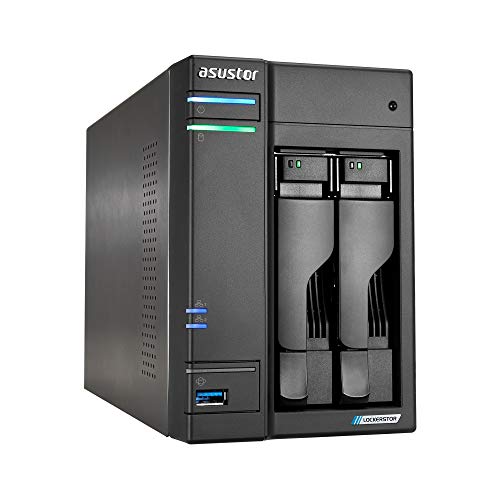
Best for: a two-bay build with cache SSDs and a long warranty Skip it if: you need four data bays
Asustor markets this one as a Plex media server directly, and the specs back a serious two-bay build. It runs an Intel Celeron N5105 quad-core with 4GB DDR4, expandable to 16GB per the listing. Asustor says it handles 4K playback and hardware transcoding, and adds dual 2.5GbE ports for multi-user access.
The standout is expansion. Asustor lists up to four M.2 NVMe slots for cache acceleration or high-speed storage pools, more cache flexibility than any other two-bay here. Released in 2022, it carries a three-year manufacturer guarantee, longer than the two-year cover on the UGREEN and TERRAMASTER units. It weighs 5.34 lb and measures 6.44 x 9.06 x 4.25 in.
Two trade-offs stand out against its price position. It ships with only 4GB, so you'll likely add memory, and its dual 2.5GbE trails the 5GbE and 10GbE units in this set. You're paying for expansion headroom and the warranty, not for out-of-box speed.
Pros:
- Four M.2 slots for cache or storage pools
- Three-year warranty, longest here
- Dual 2.5GbE for multi-user access
- Memory expandable to 16GB per listing
Cons:
- Ships with just 4GB DDR4
- 2.5GbE trails faster picks
- Premium price for a two-bay
- 2022 release, oldest in the set
6. UGREEN NAS DXP4800 GT 4-Bay — Best upgrade
The DXP4800 GT is the step up for creators who want four bays and the only AMD Ryzen CPU in this set.

Best for: creators wanting four bays and a Ryzen CPU Skip it if: desk space or a lighter unit matters
This is the muscle pick. UGREEN says the DXP4800 GT runs an AMD Ryzen Embedded R2514 with 4 cores and 8 threads, the only Ryzen chip and the only 8-thread processor among these seven. For running a media server alongside other apps, threads give real multitasking headroom.
Four drive bays lift your redundant storage ceiling well past the two-bay picks. UGREEN pairs it with UGOS Pro, its guided interface, plus a built-in SD card slot so creators can import footage without a card reader. There's a surveillance mode for IP cameras and a local-only account option for LAN access. It's the heaviest here at 14.6 lb, measuring 7.01 x 10.1 x 7.01 in, with a two-year warranty.
Two cautions. It sits near the top of the price range, and the listing doesn't spell out its RAM or networking, so confirm those on the page before you buy. And at 14.6 lb it's a substantial box that wants a permanent shelf, not a temporary spot.
Pros:
- Only AMD Ryzen CPU, 4 cores and 8 threads
- Four drive bays for larger arrays
- Built-in SD card slot for creators
- UGOS Pro guided interface
Cons:
- Heaviest unit at 14.6 lb
- Near the top of the price range
- RAM and networking not detailed in listing
- Large footprint for a desk
7. Asustor Lockerstor 4 Gen2+ AS6704T v2 — Best premium
The AS6704T v2 is the top-of-set pick, a four-bay with dual 5GbE and HDMI output aimed at creators.
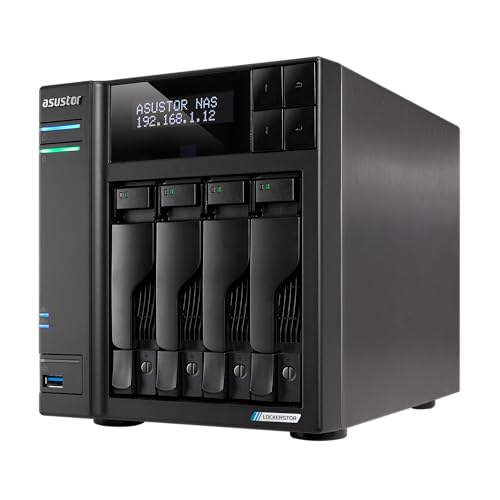
Best for: creators wanting four bays, dual 5GbE and HDMI Skip it if: you don't need four bays or the fastest networking here
The AS6704T v2 sits at the most expensive position in this set, and its feature list explains why. Asustor lists an Intel Celeron N5105 quad-core, four drive bays, and dual 5GbE ports for faster transfers than any 2.5GbE unit here. It also adds four M.2 NVMe slots for cache or tiered storage, matching the cache flexibility of its two-bay sibling but with double the data bays.
For media, the differentiator is HDMI output. Asustor says it supports hardware 4K transcoding and HDMI, so you can drive a screen directly from the box, something none of the other picks list. It weighs 6.48 lb, measures 7.3 x 9.06 x 6.69 in, and carries a three-year manufacturer warranty, the longest cover in this group alongside the AS6702T.
The honest weakness is memory: like the AS6702T it ships with just 4GB DDR4, modest for a premium four-bay, so plan to add more. And unless you genuinely need four bays and 5GbE, the cheaper picks stream just as smoothly.
Pros:
- Dual 5GbE plus HDMI output
- Four bays and four M.2 slots
- Three-year warranty, longest here
- Hardware 4K transcoding claimed
Cons:
- Most expensive pick in the set
- Ships with only 4GB DDR4
- Overkill for single-viewer homes
- HDMI and 5GbE are manufacturer claims
The verdict
Match the tier to how you'll actually stream. At the entry tier, the TERRAMASTER F2-425 is the value floor: cheapest of the seven, quiet at 19dB(A), and claiming hardware 4K decoding that covers most home libraries. It's the right buy when budget is fixed and one person watches at a time.
The middle ground belongs to the UGREEN DXP2800, my overall winner. Its Intel N100, 8GB DDR5 and 2.5GbE give real headroom at the second-cheapest position, and its guided interface suits first-time owners. If you'd rather have faster networking, the TERRAMASTER F2-425 Plus adds dual 5GbE for a small step up in price.
At the premium tier, the split is about bays. Choose the Asustor AS6704T v2 for four bays, dual 5GbE, HDMI and a three-year warranty. Choose the UGREEN DXP4800 GT if you want its Ryzen 8-thread CPU and an SD card slot for footage. The LincStation N2 is the specialist: 10GbE and 16GB for people happy to run Unraid. Start with the DXP2800 unless a specific need pushes you past it.
FAQ
Is the best NAS with Plex worth buying diskless?
The best NAS with Plex here all ship diskless, and that's normal for this class. Buying without drives lets you choose capacity and drive quality to match your library, rather than paying for disks a manufacturer picked. Budget for two or more drives on top of the enclosure price. The UGREEN DXP2800 claims up to 80TB across its bays and M.2 slots.
Is a two-bay NAS worth it for Plex?
A two-bay NAS is worth it for most home Plex libraries. Two bays let you run a mirrored array, keeping your media safe if one drive fails, and the UGREEN DXP2800 still adds two M.2 slots on top. Streaming smoothness comes from the CPU, not the bay count, so a strong two-bay like the DXP2800 or F2-425 Plus streams just as well as a four-bay.
Does more RAM improve Plex transcoding?
More RAM improves multitasking and multiple simultaneous streams more than it improves a single transcode. Transcoding leans on the CPU and its hardware decoder. That said, headroom helps: the LincStation N2 lists 16GB and the DXP2800 8GB, while the Asustor units ship with 4GB. If several people stream at once or you run other apps, favour the 8GB and 16GB picks.
DXP2800 or F2-425 Plus for a media server?
For a media server, the DXP2800 and F2-425 Plus differ mainly on networking and price. The DXP2800 is cheaper and runs 8GB DDR5 with 2.5GbE. The F2-425 Plus costs a little more and claims dual 5GbE up to 1020MB/s, which speeds large file transfers onto the server. Pick the DXP2800 for value and DDR5; pick the F2-425 Plus if fast transfers matter.
What is the biggest mistake buying a NAS for Plex?
The biggest mistake buying a NAS for Plex is overspending on drive bays while ignoring the CPU and how your files play. Bays set your storage ceiling, not playback speed. If most content direct plays to your devices, even a 4GB, 2.5GbE unit copes. Check your players' format support first, then match the processor and memory to how many people stream at once.
Your next step is to check what your TVs and phones can direct play, because that single fact decides how much CPU you need. If most of your library plays natively, the UGREEN DXP2800 gives you a modern N100, 8GB DDR5 and 2.5GbE without overpaying, and its guided interface means you won't fight the software on day one. Buy the enclosure, add two drives sized for a mirror, and you have a media server with room to grow. Save the premium four-bay money for when your library actually outgrows two bays.