Best Mechanical Keyboard for CAD Work at a Desk

Six mechanical keyboards compared for drafting work, judged on programmable keys, layout width and desk footprint rather than switch marketing. The Redragon K671 wins on remapping, with a wireless Logitech and a 9-key macro pad close behind.

By Connor SmallUpdated 17 min read
On this page
- Best mechanical keyboard for cad at a glance
- Why three of these listings were nearly cut
- What actually decides a CAD keyboard? Not the switch
- 1. Redragon Mechanical Gaming Keyboard Wired — Best overall
- 2. Logitech MX Mechanical Wireless Illuminated Keyboard — Best premium
- 3. Koolertron One Handed Macro Mechanical Keyboard — Most versatile
- 4. Keychron C2 Full Size Wired Mechanical Keyboard — Best for families
- 5. Redragon K521 Upgrade Rainbow LED Gaming Keyboard — Best budget pick
- 6. CACKBIRD 60% Wired Mechanical Gaming Keyboard with Blue — Best upgrade
- How much desk width can you really spare?
- Does a macro pad beat a full-size board?
- What these listings don't tell you
- The verdict
- FAQ
The best mechanical keyboard for CAD is the Redragon K671, because its hot-swappable red switches sit under a 17.1 in full-size deck with macro remapping, and remapping is what a drafting workflow actually needs. If you move between a desktop workstation and a laptop, the Logitech MX Mechanical pairs with up to three devices and weighs 2.49 lb instead. One specification splits this field harder than switch colour ever will: how many keys you can reassign, and whether the board remembers them without software running.
Best mechanical keyboard for cad at a glance
| Pick | Layout & width | Programmable keys | Price |
|---|---|---|---|
Best overall Redragon K671 |
Full size 17.1 in wide |
Macro editing, key remap claim | Check Price |
Best premium Logitech MX Mechanical |
Full size 17.9 in wide |
Fn keys via Logi Options+ | Check Price |
Most versatile Koolertron 9-Key Macro Pad |
Numpad only 6.69 in wide |
All 9 keys, 4 layers claimed | Check Price |
Best for families Keychron C2 |
Full size 17.1 in wide |
None published | Check Price |
Best budget pick Redragon K521 |
104 keys full size |
12 multimedia combos | Check Price |
Best upgrade CACKBIRD 60% |
61 keys 12.2 in wide |
None published | Check Price |






Why three of these listings were nearly cut
Three picks here failed a screen before they earned their place back. Worth knowing why, because the same three reasons will help you judge boards I didn't cover.
Cut reason one: no published remapping. The Keychron C2 and the CACKBIRD 60% list nothing about macros or key reassignment. For drafting, that's a real gap. Both survived on layout grounds instead, which is a narrower case.
Cut reason two: partial anti-ghosting. The Redragon K521 listing specifies 19-key anti-ghosting rather than full-key. Two of the other boards claim all keys register simultaneously. If your shortcuts stack three modifiers, that difference matters.
Cut reason three: no typing layout at all. The Koolertron is a 9-key pad measuring 6.69 x 5.51 x 2.36 in. It cannot be your only keyboard. It stayed in because a shortcut pad beside a normal board is a genuinely popular drafting setup.
What survived the screen shares three things:
- A wired or receiver-based connection, so input doesn't drop mid-command
- A published set of dimensions, so you can measure your desk before buying
- Either mechanical switches or, in one case, a stated mechanical-feel design
The Redragon K671 cleared every screen without an exception. That's why it leads.
What actually decides a CAD keyboard? Not the switch
Most guides to the best mechanical keyboard for cad compare switch types. Red versus brown versus blue, linear versus tactile. It's the wrong first question.
Here's why. Drafting is not typing. You spend most of a session holding modifiers, tapping single-letter commands, and entering numbers. The switch affects comfort. It doesn't affect whether your workflow gets faster.
What does: how many keys you can reassign, and where the assignment lives. The Koolertron listing claims configurations are stored in the keyboard's built-in MCU, so they survive a computer change. The Logitech routes customisation through Logi Options+ software, which means the software needs to be installed and running on each machine. Those are two different answers to the same problem.
Second deciding factor: numpad presence. Coordinate entry and dimension input run through the number pad. The CACKBIRD is 61 keys. That's a hard no for anyone typing values all day, regardless of how good blue switches feel.
Third: desk width against mouse room. A 17.9 in board and a mouse that needs sweeping room compete for the same surface.
Rank those three before you think about switches. Then pick a switch you'll enjoy.
1. Redragon Mechanical Gaming Keyboard Wired — Best overall
The K671 is the only pick here that combines a full-size 17.1 in layout, hot-swappable switches and published macro editing in one board.
Best for: drafters who want remappable keys on a full-size deck Skip it if: you need a silent board for a shared office
Three specifications put this ahead of the rest of the set. It measures 1.42 x 17.1 x 4.88 in, which is the shallowest front-to-back depth of any full-size board here at 4.88 in. Redragon says the switches are hot-swappable linear reds, meaning you can pull a switch and drop in a different one without soldering. And the listing claims macro editing: remapping key functions, setting shortcuts, or combining several functions under one key.
That last claim is the one that matters for drafting. If your CAD package uses a two-key command you hit two hundred times a session, collapsing it to one key is real time back. Redragon also states full-key anti-ghosting, so stacked modifier combinations should all register.
The lighting is 11 backlit modes, which is a gaming feature rather than a work one. Useful in a dim room, irrelevant otherwise.
Against the others, the trade-off is noise and build. Linear reds are smoother than tactile switches but they still bottom out audibly, and this is a mid-priced pick rather than the most solidly specified board in the set. The Logitech is quieter by design. The Keychron publishes a weight figure and a stated 50-million-keystroke switch rating; the K671 publishes neither.
Pros:
- Hot-swappable switches, the only board here offering it
- Full-size 17.1 in layout with numpad intact
- Published macro editing and key remapping
- Shallowest depth of the full-size picks at 4.88 in
- Full-key anti-ghosting claim
Cons:
- No published weight or warranty
- Linear reds are audible in a shared room
- 11 lighting modes are gaming features you likely won't use
- Only one seller lists it
2. Logitech MX Mechanical Wireless Illuminated Keyboard — Best premium
This is the only wireless pick and the only one with a stated warranty period, at 1 year limited.

Best for: anyone switching between a workstation and a laptop Skip it if: you want hot-swappable switches
The MX Mechanical is the most expensive pick here, and the specifications explain some of that. It's a 2022 release, model 920-010547, weighing 2.49 lb across 2.1 x 17.9 x 5.9 in. That makes it the widest and deepest board in this roundup, so measure before you commit.
Logitech's case rests on three claims. First, tactile quiet switches with a tactile bump but less noise than a standard mechanical. Second, low-profile keys in a full-size form factor, which changes the wrist angle compared with the taller boards here. Third, pairing with up to three devices over Bluetooth Low Energy or the included Logi Bolt receiver.
For a drafter running a workstation and a laptop, that third point is the whole argument. One board, one keypress to switch machines. Logitech also lists smart illumination that lights when your hands approach and adjusts to room light.
Customisation runs through Logi Options+, and that's the honest weakness against the K671. Your shortcut layer lives in software, not in the keyboard, so a fresh machine needs the install first. It's also the only board here you cannot re-switch, since low-profile mechanicals aren't hot-swappable. And at 17.9 in wide, it's the least desk-friendly pick in the set.
Pros:
- Pairs with up to 3 devices over Bluetooth or Logi Bolt
- Lightest full-size board here at 2.49 lb
- Stated 1 year limited warranty
- Quiet tactile switches suit shared offices
- Low-profile keys for a flatter wrist angle
Cons:
- Widest footprint in the set at 17.9 in
- Customisation depends on Logi Options+ software
- No hot-swap, so switch feel is permanent
- The highest price position here
3. Koolertron One Handed Macro Mechanical Keyboard — Most versatile
Nine fully programmable keys in a 6.69 in pad, storing configurations inside the device rather than in driver software.
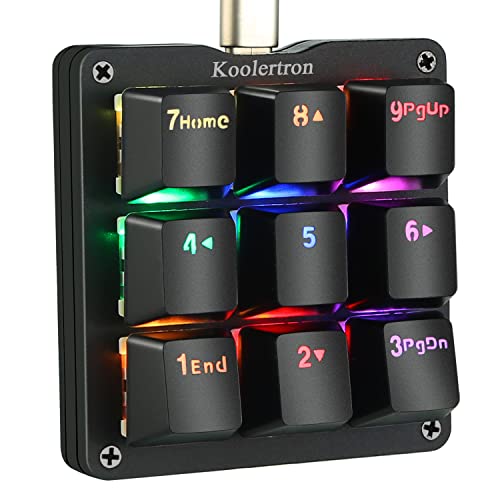
Best for: adding a shortcut pad beside an existing keyboard Skip it if: you need a full typing layout in one device
This isn't a keyboard. It's a shortcut surface, and for CAD that can be more useful than a whole extra board.
The specifications: 6.69 x 5.51 x 2.36 in in a black body with blue switches. Koolertron claims all nine keys are programmable, drawing on 127 standard buttons, web navigation keys and 19 multimedia shortcuts. The macro claim is larger still: 16 macro function buttons, chainable, supporting up to 349 key commands.
The detail that separates it from the Logitech approach is storage. Koolertron says a built-in MCU holds the configuration, so the pad keeps its assignments when you plug it into a different computer. No software install, no account. For anyone who works across machines, that's a meaningful architectural difference.
Four layers of custom configuration are claimed, which in practice means nine physical keys covering a lot more than nine commands.
The honest problems are real. This is the slowest seller of the six by a wide margin, the warranty field on the listing simply reads no, and the count field shows zero rather than a unit quantity. It's also the only pick here that requires you to already own a keyboard. Two sellers list it, which is one more than most of this set.
Pros:
- All 9 keys programmable, per the listing
- Configuration stored in built-in MCU, survives machine changes
- Smallest footprint at 6.69 x 5.51 in
- 4 layers claimed, multiplying available commands
- Detachable USB cable
Cons:
- Cannot replace a keyboard, only supplement one
- Warranty listed as none
- The slowest seller of the six here
- Blue switches are the loudest option in this roundup
4. Keychron C2 Full Size Wired Mechanical Keyboard — Best for families
The only pick with a published switch lifespan figure, rated at up to 50 million keystrokes.

Best for: a shared desk running both macOS and Windows Skip it if: you need backlit keys in a dim room
The C2 is the heaviest board here at 3.31 lb, across 1.5 x 17.1 x 5.1 in. Weight is not a flaw on a desktop keyboard. A 3.31 lb board stays where you put it when you're dragging a mouse hard against it.
Keychron's differentiator is dual-platform layout. The listing says the C2 is optimised for Mac with the necessary multimedia and function keys and a dedicated Siri key, while remaining Windows compatible. One caveat is stated plainly: Num Lock works with Windows only. If a household or studio runs both operating systems on one desk, that's the pick that stops arguments.
The switch is Keychron's own tactile brown, and the listing claims up to 50 million keystrokes of durability. No other board in this set publishes a lifespan number. Connection is USB Type-C with a braided cable.
This is the retro non-backlight version, so the keys don't light up at all. Keychron frames the colour scheme as office-appropriate, which it is, but a dark room means hunting for keys.
Against the K671, the C2 publishes nothing about macros or remapping. That's the gap. It's also the second-most expensive pick here and offers less shortcut capability than boards costing less, which is the trade it makes for build quality and cross-platform layout.
Pros:
- Switches rated to 50 million keystrokes per the listing
- Mac-optimised layout with a dedicated Siri key
- Heaviest board here at 3.31 lb, so it stays put
- USB Type-C with braided cable
- Retro colourway suits an office desk
Cons:
- No backlighting on this version
- Num Lock works on Windows only
- No published macro or remapping support
- Second-highest price position in the set
5. Redragon K521 Upgrade Rainbow LED Gaming Keyboard — Best budget pick
The cheapest of the six, and the only entry-priced pick with a stated 2-year warranty.

Best for: a second station or a first mechanical-feel board Skip it if: you press many keys at once
The K521 does the arithmetic most CAD buyers care about: 104 keys, numpad included, at the lowest price position in this set. It's the one buyers choose most often here, and the specifications show a black body with a 2-year warranty listed.
Redragon's claims focus on three areas. Twelve multimedia combination keys, aimed at office and gaming efficiency. A one-touch lighting button that toggles the backlight without a key combination. And an upgraded LED backlight design the listing describes as more penetrating than a traditional effect.
Read the switch language carefully, because it's the most important sentence on the listing. Redragon describes the keys as "designed for mechanical feeling" rather than as mechanical switches. That phrasing does a lot of work. If genuine mechanical actuation is what you're after, the K671 or the Keychron is the honest answer.
The other specification to weigh is anti-ghosting at 19 keys. The K671 and the CACKBIRD both claim all keys register simultaneously. Drafting shortcuts that stack Ctrl, Shift and a letter should be fine, but complex combinations are not guaranteed here the way they are on the full-key boards.
Against the rest of the set, this is the pick that trades switch authenticity and simultaneous-key headroom for the lowest cost and a full 104-key layout.
Pros:
- Cheapest pick in this roundup
- 2-year warranty listed
- Full 104-key layout with numpad
- 12 multimedia combination keys
- One-touch backlight toggle
Cons:
- Described as mechanical feeling, not mechanical switches
- Anti-ghosting covers 19 keys, not all
- No published weight or dimensions
- No macro or remapping capability listed
6. CACKBIRD 60% Wired Mechanical Gaming Keyboard with Blue — Best upgrade
At 12.2 in wide, this is the smallest full-typing board here by nearly 5 in.

Best for: small desks where mouse room matters most Skip it if: you enter dimensions on a numpad
The pitch is space. This board measures 1.57 x 12.2 x 5.43 in against 17.1 in and 17.9 in for the full-size picks, which frees roughly five inches of desk for mouse travel. If you orbit and pan a model with broad mouse sweeps, that reclaimed width is felt every session.
Sixty-one keys, blue mechanical switches, and CACKBIRD claims full-key anti-ghosting so every combination registers. The lighting spec is unusually detailed for an entry-priced board: 18 rainbow effects, 5 brightness levels and speeds, and one customisation mode. It's plug and play with no drivers, listed as working on Windows 10, 8, 7, XP, Vista and macOS.
Now the part that decides it for most drafters. A 60% layout has no number pad, no dedicated function row and no arrow keys as separate keys. Coordinate entry runs through the top number row, and function keys need a modifier layer. If your work involves typing dimensions, that is friction on every single value.
Blue switches are also the clickiest option in this set. They're satisfying and they carry across a room. Against the K671, this board gives up the numpad, the hot-swap sockets and the macro layer in exchange for width. It's the second-cheapest pick here, so the compromise is at least priced honestly.
Pros:
- Smallest full-typing footprint at 12.2 in wide
- Full-key anti-ghosting claim
- 18 backlight effects with 5 brightness levels
- Plug and play, no driver install
- Second-cheapest pick in the set
Cons:
- No number pad, a real problem for dimension entry
- Function keys need a modifier layer
- Blue switches are loud in shared spaces
- No published weight or warranty
How much desk width can you really spare?
Before you choose, measure. It takes a minute and it eliminates half this list.
- Measure your usable desk width. Edge to edge, minus anything fixed like a monitor arm clamp or a docking station.
- Subtract your mouse zone. For 3D orbiting, allow 10 to 12 in of clear sweep. For 2D drafting, less.
- Compare what's left to the board widths here. The picks run 12.2 in, 17.1 in, 17.1 in, 17.9 in, and 6.69 in for the macro pad.
Three of the six are 17.1 in or wider. If your remaining space is under 15 in, the CACKBIRD at 12.2 in or the Koolertron pad at 6.69 in are your realistic options.
Depth matters too, and it's the figure people forget. The K671 is 4.88 in deep, the Keychron 5.1 in, the CACKBIRD 5.43 in and the Logitech 5.9 in. On a shallow desk, a full inch of extra depth pushes your monitor back or your chair out.
Height affects your wrists: 1.42 in for the K671, 1.5 in for the Keychron, 1.57 in for the CACKBIRD, 2.1 in for the Logitech. Logitech counters with low-profile keycaps, so the tallest chassis here doesn't necessarily mean the highest keys.
Does a macro pad beat a full-size board?
For a lot of drafters, yes. Here's the reasoning behind the best mechanical keyboard for cad question that most roundups skip entirely.
A full-size board gives you every key in one place. A macro pad gives you nine keys you've assigned yourself, sitting under your left hand where your fingers already rest. The Koolertron listing claims 16 macro buttons chainable to 349 key commands across 4 layers. That's a lot of workflow compressed into a small footprint.
The catch is that you need both devices. Pad plus keyboard means two USB connections and 6.69 in of extra desk.
Three situations where the pad wins:
- You already own a keyboard you're happy with
- Your CAD package leans on long modifier chains
- You move between computers and don't want to reinstall driver software
Three where a single full-size board wins:
- Desk space is genuinely tight
- You want one cable and one thing to set up
- You'd rather learn the shortcuts than build a layer
My default advice: buy the K671 first. Its macro editing may cover what you need without a second device. Add the pad later if your hand keeps travelling to the same three keys.
What these listings don't tell you
Listing data has gaps, and being clear about them is more useful than filling them with guesses.
Actuation force is absent everywhere. Redragon says its reds require less force than a tactile switch, but no board here publishes a gram figure. If you type all day and force matters to your hands, you're buying on switch type rather than a number.
Keycap material is mentioned once. The K671 lists double-shot PBT keycaps. Nobody else specifies material, so you can't compare wear resistance across the set.
Cable length is unpublished on every pick. The Keychron confirms USB Type-C with a braided cable and the Koolertron confirms detachable USB. Neither gives a length. Measure your desk-to-tower run and keep an extension handy.
Battery life on the wireless pick isn't stated. Logitech lists Bluetooth Low Energy and a Logi Bolt receiver, but no runtime figure appears.
Software compatibility with CAD packages is nobody's claim. Macro editing works at the operating system level. Whether your specific drafting application respects a remapped key is between you and that application, and no listing here promises otherwise.
One more gap worth naming: the keyword you searched includes drafting as a qualifier, but none of these boards is sold as a CAD product. They're general keyboards and gaming keyboards, and you're judging them on layout and programmability. That's the right way to judge them anyway.
The verdict
The Redragon K671 is the best mechanical keyboard for cad in this set, and the reason is narrow and specific: it's the only board that puts a full 17.1 in layout, hot-swappable switches and published macro editing in one chassis. Full-key anti-ghosting means stacked modifier shortcuts register. The 4.88 in depth is the shallowest of the full-size picks, so it takes less of your desk than the alternatives.
Two conditions flip that recommendation.
If you work across two machines, the Logitech MX Mechanical wins on a capability the K671 doesn't have at all: pairing with up to 3 devices via Bluetooth Low Energy or the included Logi Bolt receiver. Its quiet tactile switches also make it the only sensible pick for an open office. You give up hot-swap and you accept a 17.9 in footprint.
If your usable desk width after mouse room is under 15 in, neither full-size board fits. The CACKBIRD at 12.2 in is the answer, and you accept losing the numpad. Pair it with the Koolertron pad at 6.69 in if you want a number entry surface back.
The Keychron C2 stays on the list for one scenario only: a desk shared between macOS and Windows, where its Mac-optimised layout and 50-million-keystroke switch rating earn their place. The K521 is the pick for a second workstation you don't want to spend much on.
FAQ
Is a mechanical keyboard worth it for CAD work?
A mechanical keyboard is worth it for CAD work mainly for the programmable keys rather than the typing feel. The K671 lists macro editing that collapses multi-key commands into single presses, and the Koolertron claims up to 349 key commands across 9 buttons. If your shortcuts are already muscle memory, the gain is smaller and comfort becomes the reason.
Which is the best value pick in this roundup?
The best value pick is the Redragon K521. It's the cheapest of the six, includes all 104 keys with a numpad, lists a 2-year warranty and carries 12 multimedia combination keys. The compromise is honest: the listing describes it as mechanical feeling rather than mechanical, and anti-ghosting covers 19 keys instead of all of them.
Do I need a number pad for drafting and dimension entry?
You need a number pad if you type coordinate values or dimensions regularly. Four picks here keep one: the K671 and Keychron C2 at 17.1 in, the K521 at 104 keys, and the Logitech at 17.9 in. The CACKBIRD 60% has 61 keys and no numpad, pushing all number entry to the top row.
Redragon K671 or Logitech MX Mechanical: which should I buy?
Redragon K671 or Logitech MX Mechanical comes down to one question: do you use more than one computer? The Logitech pairs with up to 3 devices and weighs 2.49 lb. The K671 is wired, hot-swappable and 4.88 in deep against Logitech's 5.9 in. Single workstation, take the K671. Two machines, take the Logitech.
What's the most common mistake buying a keyboard for CAD?
The most common mistake buying for drafting is choosing a switch before measuring your desk. Three of these boards are 17.1 in or wider, and a 3D workflow needs 10 to 12 in of clear mouse sweep. Buyers also overpay for lighting modes: 18 rainbow effects change nothing about how fast you draft.
Measure your desk first, then decide whether you need one board or a board plus a shortcut pad. If the numbers allow a full-size layout, the Redragon K671 is the default because it's the one pick here that doesn't force a compromise: numpad intact, switches swappable when your preference changes, and a macro layer that lives on the keyboard rather than in an app you have to reinstall. Everything else in this set is a specific answer to a specific constraint. The K671 is the answer when you don't have one.