Best Budget Tower Surge Protector for a Home Desk

Six tower power strips, ranked by what the listings actually publish: joule ratings, footprints, cord lengths and USB-C counts. The winner is the cheapest one here, and that is not an accident.

By Connor SmallUpdated 17 min read
On this page
- Best budget tower surge protector at a glance
- How I screened these six tower units
- What actually decides a best budget tower surge protector?
- Joules, amps and watts: which number matters?
- 1. UWIWUTEI 6FT Power Strip Tower Surge Protector — Best overall
- 2. UWIWUTEI 6FT Power Strip Tower Surge Protector, 16 Outlets — Best for beginners
- 3. KZNXCVI Power Strip Tower Surge Protector — Best compact
- 4. JACKYLED Power Strip Tower Surge Protector — Best for heavy use
- 5. PASSUS Surge Protector Power Strip Tower — Best for families
- 6. TESSAN Tower Power Strip Flat Plug — Best premium
- How much desk space will each one eat?
- What the listings do not tell you
- When a different pick wins
- The verdict
- FAQ
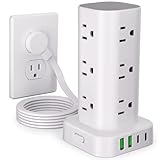
The best budget tower surge protector is the UWIWUTEI HD-Q16, which pairs 12 wide-spaced AC outlets and four USB ports with a claimed 1800J rating, the highest published joule figure in this group, inside a 3.15 in square body. If your outlet sits behind a sofa and you need the cord to reach further, the PASSUS XT-U3011 and its 10 ft cord is the better buy. This is not a category for anyone running a gaming rig, a laser printer or a space heater.
Best budget tower surge protector at a glance
| Pick | Surge rating | Outlets + USB | Price |
|---|---|---|---|
Best overall UWIWUTEI HD-Q16 |
1800J claim | 12 AC 4 USB (2 C) |
Check Price |
Best for beginners UWIWUTEI HD-Q6 |
Not stated | 16 AC 5 USB (2 C) |
Check Price |
Best compact KZNXCVI 12-Outlet Tower |
Not stated | 12 AC 4 USB (2 C) |
Check Price |
Best for heavy use JACKYLED QK1260-U3 |
1050J claim | 12 AC 6 USB (2 C) |
Check Price |
Best for families PASSUS XT-U3011 |
Not stated | 12 AC 5 USB-A |
Check Price |
Best premium TESSAN TPS02-US-C |
1050J claim | 11 AC 3 USB (1 C) |
Check Price |


How I screened these six tower units
I started with the vertical tower format specifically, because a flat strip and a tower solve different problems. A tower puts outlets on four faces, so a wall wart on one side does not block the next socket. That is the whole reason people buy the shape.
From there I lined up the published specifications side by side and kept only what the listings actually state:
- Outlet count and USB mix. Every pick here carries at least 11 AC outlets. Four of the six publish a USB-C count.
- Published joule rating. Three of the six state one. That is a real gap, and it shapes the ranking below.
- Physical footprint. I used the listed dimensions, not marketing adjectives.
- Cord length. Ranges from 6 ft to 10 ft across this set.
- Stated warranty. Four of the six publish one. Two say nothing.
What got cut: single-row strips, wall taps, and anything with no dimensions published at all. A tower you cannot measure is a tower you cannot plan around.
A note on the word budget. Amazon's results for a best budget tower surge protector are not filtered by price, so the qualifier is something you have to apply yourself at the moment you click through. What I can tell you is where each pick sits relative to the other five, and I do that in every section below.
What actually decides a best budget tower surge protector?
Most guides to a best budget tower surge protector compare outlet counts. Sixteen beats twelve, twelve beats eleven, done. That is the wrong axis.
Here is the reason. Every tower in this class shares one 15A household circuit through one cord. Adding outlets does not add capacity. It only adds places to plug things in. The UWIWUTEI HD-Q6 lists 16 AC sockets and quotes 1875W at 125V, which is the same ceiling a six-outlet strip works under. Sixteen outlets is a convenience feature, not a power feature.
Three things actually decide it:
- The joule rating, which is the energy the protective components can absorb before they stop protecting. Higher is better and the spread here is wide.
- The footprint, because a tower that does not fit where you need it is worthless at any price.
- The plug profile, because a 0.3 in flat head slides behind a nightstand and a standard block does not.
Everything else is packaging. Night lights, per-bank switches and retractable cords are nice, and I'll flag them where they exist, but none of them changes whether your monitor survives a spike.
Joules, amps and watts: which number matters?
Three numbers appear across these listings and they measure completely different things. Getting them mixed up is the most common mistake in this category.
A joule rating is surge absorption capacity. The HD-Q16 claims 1800J. The JACKYLED QK1260-U3 and the TESSAN TPS02-US-C both claim 1050J. Those are the only three figures published in this group, and 1800J is a meaningful margin over 1050J on paper.
An amp figure is overload cutoff. Both the HD-Q6 and the KZNXCVI tower list 10A overload protection. That is the point where the internal breaker trips because you asked for too much at once. It says nothing about spikes.
A watt figure is total draw. The HD-Q6 quotes 1875W at 125V. That is your load ceiling, and it is where a hair dryer or a portable heater gets you in trouble.
Here is the trick with joules: they are consumed. A protector that eats several small spikes has less capacity left than the box promised, and none of these six publishes an indicator light for protection status. So the practical advice is boring but correct. Buy the higher rating when you can, and treat any tower in this price range as a consumable you replace after a serious storm, not a permanent fixture.
1. UWIWUTEI 6FT Power Strip Tower Surge Protector — Best overall
The cheapest pick here also carries the highest published joule rating, which makes the rest of the comparison short.
Best for: a home desk with a dozen low-draw devices and no room behind it Skip it if: you need more than four USB ports
Model HD-Q16 is the only unit in this set that combines the top surge figure with the bottom price position. UWIWUTEI states 1800J, against 1050J from both the JACKYLED and TESSAN towers, and nothing at all from the other two. On published numbers alone that is the strongest protection claim here.
The layout is 12 AC outlets plus four USB ports, split two USB-A and two USB-C. UWIWUTEI puts total USB output at 3.4A, with a single USB-C port rated to 3.4A on its own. That is phone-and-earbuds territory, not laptop territory.
The plug is where this one earns its place on a bedroom nightstand. The listing describes a 0.3 in flat head that sits flush to the wall, on a 6 ft cord. The body measures 3.15 in across, so it takes up roughly a coaster of desk.
The trade-off against the rest of this set is USB capacity. The JACKYLED gives you six ports and the HD-Q6 gives you five, so if half your devices charge over USB rather than through a wall brick, four ports will run short fast. It's also the one buyers here choose most often, which tells you the value calculation is not a secret.
Pros:
- Highest published joule rating in this set at 1800J
- Cheapest of the six
- 0.3 in flat plug fits behind furniture
- 2-year manufacturer warranty stated
- Compact 3.15 in square footprint
Cons:
- Only four USB ports, fewest among the USB-C capable picks
- 3.4A shared USB output is modest for tablets
- No per-bank switching, unlike the JACKYLED
- Only one seller lists it
2. UWIWUTEI 6FT Power Strip Tower Surge Protector, 16 Outlets — Best for beginners
Twenty-one total ports for the second-cheapest price here, as long as you accept that no joule figure is published.

Best for: a first tower where outlet count is the only real requirement Skip it if: you want a published joule figure before you buy
Model HD-Q6 is the maximalist of the group. Sixteen AC sockets, three USB-A and two USB-C, which UWIWUTEI adds up to 21 devices at once. Nobody needs 21 at once, but the extra sockets mean you never have to unplug something to plug in something else.
The published electrical detail is the clearest here. UWIWUTEI quotes 1875W at 125V, 10A overload protection, a built-in short-circuit fuse and lightning protection. Note the wording. Lightning protection is stated, a joule number is not, and those are not the same commitment. On the specifications that exist, this is the pick I'd hand a first-time buyer who just wants sockets.
At 2 lb it's the only unit in this set with a published weight, and it's heavier than the shape suggests. The plug is listed at 0.1 in thick on the flat side and the cord runs 6 ft.
Against the HD-Q16 above, you're trading a stated 1800J rating for four extra outlets and one extra USB port. For a desk full of laptop bricks and monitors that trade makes sense. For anything you'd hate to replace, it doesn't.
Pros:
- 16 AC outlets, most in this set
- Five USB ports including two USB-C
- 1875W and 10A limits both published
- Second-cheapest of the six
- 2-year warranty stated
Cons:
- No joule rating published, unlike three rivals
- 2 lb body is the heaviest listed here
- Extra outlets add no extra circuit capacity
- Only one seller lists it
3. KZNXCVI Power Strip Tower Surge Protector — Best compact
A 3.2 in square footprint with 20W per-port USB output, which is the most useful charging spec in this group.

Best for: a 3.2 in square of free desk beside a monitor stand Skip it if: you want a stated joule rating
KZNXCVI publishes the tightest useful number in this whole comparison: 5V/3.6A, up to 20W, per USB-A or USB-C port when used individually. Shared across all four the ceiling is 5V 3.6A. Nobody else here quotes per-port wattage, and 20W is the difference between a phone charging overnight and a phone charging over lunch.
The dimensions read 3.2 x 3.2 in for the column, which the listing gives as 3.2 x 3.2 x 5.8 in overall. That is fractionally wider than the HD-Q16 and still small enough to tuck beside a monitor arm. The flat plug measures 0.35 in and the cord is 6 ft.
Layout is 12 wide-spaced AC outlets and four USB ports, two of them USB-C. Protection is described as fire-resistant material, a heavy-duty copper cord, 10A overload protection and an on/off switch.
Here's the catch, and it's the same one as the HD-Q6. No joule figure. This unit sits in the middle of the price range for this set, so you're paying more than the HD-Q16 and getting less published surge information in return. What you gain is the best-documented USB charging here.
Pros:
- 20W per USB port, best published charging figure here
- Compact 3.2 x 3.2 in footprint
- Two USB-C ports among four total
- 0.35 in flat plug for flush wall fit
- 2-year warranty stated
Cons:
- No joule rating published
- Costs more than the higher-rated HD-Q16
- No published weight
- Shared USB output drops to 3.6A total across four ports
4. JACKYLED Power Strip Tower Surge Protector — Best for heavy use
Six USB ports and an independent switch on every layer, which is what you want when you're powering things down bank by bank.

Best for: a workbench or AV rack where you switch banks on and off daily Skip it if: your outlet is hidden behind furniture
Model QK1260-U3 is the workhouse layout. Twelve AC outlets spaced 2.2 in apart, six USB ports with two of them USB-C, and JACKYLED states 1050J of surge protection alongside RoHS and FCC certification.
Two features here exist nowhere else in this set. First, an independent switch on each layer, so you can kill the bank feeding your speakers without unplugging your router. Second, a retractable 6.5 ft copper cord that spools by rotating the tower, which means you set the slack you need and hide the rest inside the body.
It is also the biggest unit here at 11 x 5.6 x 5.6 in. That is roughly double the width of the HD-Q16 and it is a floor or shelf unit, not a nightstand one. Released in 2020, and it's the only pick in this group with more than one seller listing it.
The compromises are real. Warranty is stated as 1 year, the shortest here, against 2 years from four rivals. The 1050J rating is well under the HD-Q16's claimed 1800J while the price sits higher. You're buying the switching and the cord management, not the protection.
Pros:
- Six USB ports, most in this set
- Independent switch on each layer
- Retractable 6.5 ft cord, longest adjustable option here
- 2.2 in outlet spacing published
- 1050J rating stated, plus RoHS and FCC
Cons:
- 1-year warranty, shortest of the six
- 11 x 5.6 x 5.6 in body is the largest here
- 1050J is well below the cheaper HD-Q16's claim
- No flat plug, so it won't sit flush behind furniture
- Slowest seller of this set apart from the PASSUS
5. PASSUS Surge Protector Power Strip Tower — Best for families
A 10 ft cord and four separate switches, for the living room outlet that sits nowhere near the TV.

Best for: a living room outlet 10 ft from where the devices sit Skip it if: you charge USB-C phones or tablets
Model XT-U3011 solves one problem better than anything else here: distance. The cord is 10 ft, against 6 ft on three picks and 6.5 ft on the JACKYLED. That extra reach is the difference between a tower sitting where the family actually uses it and a tower stranded at the baseboard.
The layout is 12 AC outlets and five USB ports, and this is the important detail: all five are USB-A. The colour is listed as Black-5 USB A. There is no USB-C on this unit, which in 2026 rules it out for a lot of households.
Two extras stand out. Four separated switches control four sections, so one press kills a whole zone. And a white night light with three brightness levels, which is genuinely useful on a hallway or bedroom tower and appears on no other pick here. PASSUS also describes a built-in circuit breaker plus surge protection, with FCC and CE marks.
The gaps are frustrating for a unit sitting in the upper price range of this set. No joule rating, no stated warranty, no published weight, and it is the slowest seller in this group. At 6.8 x 4.9 x 3.8 in it's the second-largest here.
Pros:
- 10 ft cord, longest in this set
- Four independent bank switches
- Three-level night light, unique here
- 12 AC outlets plus five USB-A ports
- Built-in circuit breaker stated
Cons:
- No USB-C at all
- No joule rating published
- No warranty stated, unlike four rivals
- Upper price position for the least published data here
6. TESSAN Tower Power Strip Flat Plug — Best premium
The narrowest tower here at 2.55 in across, with a 1050J rating and a 0.31 in flat plug.

Best for: a tight nightstand or shelf where 2.55 in is the limit Skip it if: you need more than 11 outlets
Model TPS02-US-C is the small one. TESSAN lists 6.61 x 2.55 x 2.55 in, which makes it the slimmest column in this comparison by a clear margin. The KZNXCVI needs 3.2 in of width and the JACKYLED needs 5.6 in. If your gap is narrow, this is the answer.
You give up outlets for that. Eleven AC sockets and three USB ports, which is the lowest count here on both. The USB split is two USB-A at 2.4A and one USB-C at 3A. TESSAN states 1050J of surge protection with overload, short-circuit and over-current protection, plus a switch that shuts off automatically.
Practical touches: a 0.31 in flat plug on a 6 ft cord, four rubber feet on the base so it doesn't skate across a desk, and a four-sided layout so plugs don't crowd each other. Released in 2020, with a 2-year warranty stated.
The problem is the price position. This is the most expensive pick here, and it delivers 1050J against the HD-Q16's claimed 1800J, with one fewer outlet than every other unit in this set. You are paying for the narrow footprint and the finish. If 3.15 in fits your space, the cheapest pick here beats it on paper.
Pros:
- Narrowest footprint here at 2.55 in square
- 1050J rating published
- 0.31 in flat plug for flush wall fit
- Rubber feet on the base
- 2-year warranty stated
Cons:
- Most expensive pick here
- Only 11 outlets and three USB ports, fewest in this set
- 1050J against the cheapest pick's 1800J claim
- Only one USB-C port
How much desk space will each one eat?
Footprint is where these six actually differ, and the published dimensions tell you more than any photo will. Measure your gap before you order.
- TESSAN TPS02-US-C: 2.55 x 2.55 in column, 6.61 in tall. The narrowest here.
- UWIWUTEI HD-Q16: 3.15 in square, listed at 5.79 in tall.
- KZNXCVI tower: 3.2 x 3.2 in, 5.8 in tall.
- UWIWUTEI HD-Q6: listed at 3.4 in on the short side, 5.7 in on the long.
- PASSUS XT-U3011: 6.8 x 4.9 x 3.8 in. Shelf or floor territory.
- JACKYLED QK1260-U3: 11 x 5.6 x 5.6 in. The largest by a wide margin.
Three of the six list a flat plug thickness: 0.3 in on the HD-Q16, 0.31 in on the TESSAN, 0.35 in on the KZNXCVI. That matters if the outlet lives behind a bed frame or a sofa back, because a standard plug block needs several inches of clearance and a flat head needs less than half of one. The JACKYLED and the PASSUS publish no flat plug spec, and both are large enough that hiding them was never the plan.
What the listings do not tell you
There are gaps in this data that no amount of reading will close, and it's worth knowing where they are before you buy.
Protection status indicators. None of these six publishes a "protected" light. Surge components degrade as they absorb spikes, so a tower can look fine and protect nothing. Without an indicator, you're guessing.
Clamping voltage and response time. Joules tell you capacity. Clamping voltage tells you at what point protection kicks in. No listing here states one.
Warranty scope. Four picks state a term. Two years for both UWIWUTEI units, the KZNXCVI and the TESSAN. One year for the JACKYLED. None of them says what the warranty covers, and connected-equipment coverage is a different thing from a warranty on the strip itself. Assume you have the latter only.
Two picks publish nothing on surge capacity. The HD-Q6, the KZNXCVI and the PASSUS all describe protection in words rather than joules. Words are not a figure.
That is the honest limitation of shopping a best budget tower surge protector from listing data. You can compare what brands publish, and you can notice who publishes less. You cannot verify any of it, which is exactly why I weighted the picks that state a number.
When a different pick wins
The winner is the default, not the rule. Four specific situations flip it.
- Your outlet is more than 6 ft from where the devices sit. Go PASSUS XT-U3011. Its 10 ft cord is the only one here that reaches, and no extension chain is safer than the right cord length.
- You need six USB ports or per-bank switching. Go JACKYLED QK1260-U3. Independent switches on every layer and a retractable 6.5 ft cord are unique to it, and worth the shorter 1-year warranty if you power things down daily.
- Your gap is under 3 in wide. Go TESSAN TPS02-US-C. At 2.55 in square it fits where nothing else here does, and 11 outlets is plenty for a nightstand.
- You want maximum USB charging speed per device. Go KZNXCVI. It's the only pick publishing 20W per port, which is a real answer rather than a shared total.
And one situation where you should skip this whole category. If you're powering a desktop gaming PC, a NAS, a laser printer or anything with a heating element, a tower in this class is the wrong tool. You want a dedicated protector with a published clamping voltage and connected-equipment coverage, and you want it plugged straight into the wall.
The verdict
If you're outfitting a home desk with a laptop, two monitors, a phone and a pile of small chargers, buy the UWIWUTEI HD-Q16. It is the cheapest pick here and the only one claiming 1800J, and no other unit in this set gives you a better published protection figure at a lower price position. The 3.15 in footprint and 0.3 in flat plug mean it fits places the larger towers don't.
If you're wiring a living room, a workbench or anywhere the outlet is stranded across the room, buy the PASSUS XT-U3011 for its 10 ft cord, or the JACKYLED QK1260-U3 if per-layer switching matters more than reach. The cutoff is 6 ft. Under that distance the HD-Q16 wins on every published number that counts. Over it, cord length beats joules, because a tower you can't position is a tower you'll end up chaining to an extension cord.
The runner-up's exact advantage over the winner is ports, not protection: the HD-Q6 gives you 16 outlets and five USB against 12 and four, for a slightly higher price and no published joule rating at all. Take that deal only if socket count is genuinely your bottleneck.
FAQ
Is a budget tower surge protector worth it over a flat strip?
A budget tower surge protector is worth it when your plugs are bulky. The four-sided layout means a wall wart on one face doesn't cover the next socket, which a single-row strip can't manage. Towers here range from a 2.55 in square TESSAN to an 11 in JACKYLED, so you're also choosing a footprint shape, not just an outlet count.
How many joules do I actually need?
How many joules you need depends on what's plugged in. For phones, lamps, routers and speakers, the 1050J claimed by the TESSAN and JACKYLED covers ordinary line noise. The HD-Q16's claimed 1800J gives more headroom for the same money. For a desktop PC or anything expensive, step outside this class entirely and buy a protector with published clamping voltage.
HD-Q16 or KZNXCVI: which should I pick?
Between the HD-Q16 and KZNXCVI, the deciding factor is USB speed versus surge rating. Both give 12 AC outlets, four USB ports and two USB-C. The HD-Q16 claims 1800J and costs less. The KZNXCVI publishes 20W per USB port, the clearest charging figure here, and needs 3.2 in of width against 3.15 in.
Does more outlets mean more power available?
More outlets does not mean more power. Every tower here draws through one cord on one household circuit. The HD-Q6 lists 16 sockets and 1875W at 125V, the same ceiling a smaller strip works under. Extra outlets add convenience only. Plug in a heater or hair dryer and the 10A overload protection trips regardless of how many sockets sit unused.
What is the biggest mistake buyers make with a budget tower surge protector?
The biggest mistake with a budget tower surge protector is treating it as permanent. Surge components wear out as they absorb spikes, and none of these six publishes a protection status light. After a serious storm you have no way to know whether protection remains. Replace the unit rather than trusting it, and never daisy-chain one into another strip.
Measure the gap where the tower will live, then check the cord distance to your outlet. Those two numbers eliminate four of these six picks before you compare anything else, which makes the decision far faster than reading feature lists does. For most desks the answer lands on the UWIWUTEI HD-Q16, and the reason is simple: it is the only unit here that pairs the lowest price position with the highest published surge figure, so nothing you'd give up is a specification the others actually beat it on. Everything else in this group is a specific fix for a specific constraint.